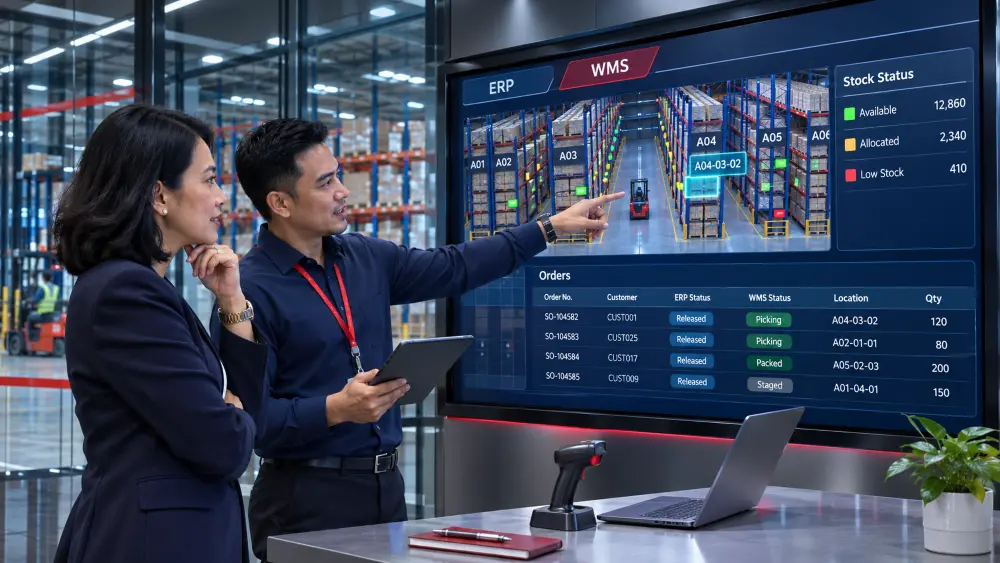
Yes. A warehouse management system (WMS) can be added to an existing enterprise resource planning (ERP) system. Businesses consider WMS ERP integration when ERP still handles sales, purchasing and finance well, but the warehouse needs better support for receiving goods, locating stock, picking orders or confirming dispatch.
ERP manages business records such as customer orders, purchase orders, invoices and stock balances. WMS focuses on the warehouse work behind those records: which goods arrived, where staff stored them, which items were picked and what left the warehouse.
Some ERP systems already include warehouse management. A separate WMS is worth considering when the warehouse functions currently used in ERP do not meet the business’s needs. For example, staff may still rely on spreadsheets to locate goods or paper lists to pick orders. The assessment should establish whether the existing ERP can support that work or whether a separate WMS is needed.
Connecting the systems means passing specific records between them. A purchase order in ERP can be sent to WMS so the warehouse can check a delivery against the order. WMS records the quantity actually received and sends it back to ERP to update stock. Customer orders and dispatch confirmations can be connected in the same way, so sales and purchasing can use updated order and stock records.
These details matter when sales has already promised goods to a customer. If the stock record is wrong, the warehouse may be unable to complete the order. The business may then face a cancellation, urgent replacement purchases or additional transport costs. Repeated delivery failures can also damage the customer relationship.
Revlon reported production and shipment disruption after an ERP rollout in the United States in 2018. Its annual report estimated the resulting reduction in net sales at approximately US$64 million.
The Revlon case is a warning about implementation risk. The decision to add WMS should still be based on the warehouse functions a business need and what its current ERP can provide.
Key Takeaways
- A WMS with an existing ERP can improve warehouse processes while retaining ERP functions that still meet the business’s needs. The required connection must be assessed before proceeding.
- Review current ERP warehouse functions and working practices before selecting another application.
- Sales and purchasing need stock information that reflects actual receipts, dispatches, reservations and inspection holds.
- The connection should remove repeated entry and allow staff to identify stock updates that have not completed.
- Assess the full project cost against documented errors, correction expenses and time spent on manual checks.
- Test the complete warehouse process and prepare staff before extending the system to more locations or orders.
Table of Contents:
When Is It Sensible to Retain ERP?
Retaining ERP is worth considering when it continues to serve the business and the main problems concern warehouse work. Replacing purchasing, sales and finance functions may add work that is unnecessary if the warehouse issues can be resolved separately.
Some ERP systems already include warehouse functions. The business may need to configure those functions, improve staff training or correct the receiving process. For example, recording the quantity ordered instead of the quantity delivered will produce an inaccurate stock record. The receiving procedure needs to prevent that error, regardless of which system is used.
A standalone WMS is a separate warehouse application that can connect to ERP. It becomes relevant when the business needs warehouse functions that its current ERP setup cannot adequately provide, such as managing storage locations, receiving or picking.
The investment proposal should explain how the work will change. If staff regularly search for goods, copy records into ERP or correct stock after an order has been promised, the proposal should show how the new process will address these recurring warehouse problems.
How Should ERP and WMS Work Together?
ERP can continue to manage purchase orders, sales orders and financial records. WMS can manage the receipt, storage, picking and dispatch of goods. The connection between them keeps the related orders and stock records updated as warehouse work is completed.
For example, the connection can send purchase orders from ERP to WMS so that staff can check a delivery against the order. The warehouse records what actually arrived, and the receipt details return to ERP. Dispatch confirmations and approved stock corrections also need to update the appropriate ERP records.
Plan the data exchange between WMS and ERP around the following records and activities:
| Record or activity | What To Establish Before Connecting The Systems |
|---|---|
| Product records | Where products are created and how both systems identify the same item and quantity unit. |
| Purchase orders | Which order details reach WMS and how later changes are passed across. |
| Goods received | How the quantity actually delivered updates ERP. |
| Dispatch | Which confirmation records that goods have left the warehouse and updates ERP. |
| Stock corrections | Who approves a correction and how it reaches the other system. |
| Stock available for customers | Which figure sales uses after allowing for reservations and stock held for inspection. |
With warehouse management system integration, staff should record each receipt once in WMS. The connection should then update ERP, removing the need to enter the same details again.
Why Might the Stock Figures Differ?

ERP and WMS can show different stock figures if one system has recorded a movement and the other is still waiting for the update. An incorrect entry or a failed update can also cause a difference. Staff need to establish the cause before adjusting stock.
Consider a distributor with 100 units of a product recorded in both systems. The business orders another 40 units, but the supplier delivers 36. The warehouse should record 36 units received, bringing the total to 136.
If staff record all 40 as received, the system will show four units that are not in the warehouse. Purchasing must keep those four units outstanding or close the balance through the company’s short-delivery procedure.
A correct receipt entry can still produce a temporary difference between the systems. The following example assumes there are no other stock movements:
| Stage | WMS recorded stock | ERP recorded stock |
|---|---|---|
| Before the delivery | 100 | 100 |
| The warehouse records 36 units received; ERP has not processed the receipt update yet | 136 | 100 |
| ERP processes the receipt update | 136 | 136 |
The figures differ temporarily because the receipt has reached one system before the other. In Microsoft’s external ERP example, warehouse stock is updated before the external ERP processes the receipt. The steps and timing in that example apply to the Microsoft setup described.
Staff should be able to check inventory updates between WMS and ERP and see whether each update is complete, still waiting or has failed. That information helps them resolve the difference without making an unnecessary stock correction.
The 136 units recorded in this example are not automatically available for new orders. Some may already be reserved for another customer or held for inspection. Sales needs the available quantity when confirming what can be supplied.
What Needs to Be Established Before Integration?
Before integration begins, establish which warehouse activities the connection will support, whether the records match and how staff will resolve update failures. These WMS integration requirements need to be assessed against the ERP product and version in use.
An application programming interface (API) allows applications to exchange information. API access alone does not establish that the connection can handle the business’s full warehouse process. When choosing a warehouse management system, check how purchase orders, received quantities, dispatch confirmations and order changes will pass between WMS and ERP.
Build the Business Case Around Actual Costs
Compare the full cost of adding and connecting WMS with the warehouse problems shown in your operating records. Keeping ERP may avoid a wider replacement project, but adding WMS still requires integration, data preparation, testing, training and staff time.
The budget should include these WMS implementation costs:
Assess the expected benefits using measures the business can verify:
- Staff time: Record the time spent checking stock, correcting errors and following up on updates. Reducing that work can free staff for other duties. Count it as a payroll saving only if payroll costs will fall.
- Correction expenses: Use actual costs for returns, replacement packing and additional deliveries caused by errors.
- Delivery performance: Identify missed dispatch commitments caused by warehouse issues.
- Revenue: Record confirmed cancellations or lost orders separately from delivery delays. A delayed order is not necessarily a lost sale.
Before accepting a proposal, review the work included, what your staff must prepare and the tests required before launch. Keep the same measures after implementation so management can assess whether the warehouse problems have improved.
Prepare for Launch Before Extending the Rollout
A first rollout can cover one warehouse or a selected group of orders if the business can clearly separate that work from the rest of the operation. The selected area still needs to complete the full process, from receiving goods to dispatching orders and updating ERP.
Data preparation and WMS data migration should cover product details, storage locations and the stock quantities transferred to the new system. Check the transferred records before warehouse staff begin using them.
Test receiving, storage, picking, dispatch and approved stock corrections, including their ERP updates. The trial should include a short delivery, a carton-to-unit conversion and a failed stock update. A receiving test alone does not establish that orders can be dispatched correctly.
Staff need time to practise their daily tasks before launch. The rollout plan should also account for the risk of interrupting operations, staff availability and work that affects other warehouses or orders.
ERP and WMS will remain in use together. If the business temporarily keeps an old spreadsheet or paper record to check the new setup, allow for the extra work and set a date to end that temporary process.
The schedule must allow time for data preparation, process decisions, integration, testing and training. Incomplete product records or unavailable staff can delay launch even when the software is ready. Agree the schedule around the work and the people needed to complete it.
The proposal should separate initial project costs from recurring charges. Keeping ERP may avoid an ERP replacement project, but it still leaves the work needed to introduce and support WMS.
Discuss Your Warehouse and ERP with QubeApps

At QubeApps, we offer QubeWMS for receiving, putaway, picking, packing and inventory movement, with barcode scanning and API-based connectivity. Putaway covers moving received goods into their storage locations.
Our implementation services include reviewing warehouse requirements, configuring the system and integration, testing, deployment, training and ongoing support. For a business retaining ERP, we start with the warehouse functions needed and the information that must pass between the systems.
Talk to QubeApps about your WMS integration requirements. Share the ERP you use, the warehouses involved and examples of recurring stock or delivery problems. We can then discuss the work your business needs to address.