
When a school canteen has to serve many students in a short recess, counting cash and giving change can slow the queue. Students have less time to eat, while staff still need to check the day’s collections against sales.
A school canteen management system (CMS) combines software and counter equipment to record purchases, manage payments and produce sales reports. With prepaid cards, students pay using money added in advance, so cashiers do not need to handle cash for each purchase. The records also help schools and stall operators check daily collections. Our guide to canteen management systems explains the wider functions.
The changeover needs care. If a student’s card is not ready or no money has been added, they may be unable to buy food. A payment problem at the counter can also delay everyone waiting behind them. Before the changeover date, confirm how parents will add money and practise purchases with students and counter staff. The school and stall operators should also agree how students will receive meals when payment cannot be completed.
Key Takeaways
- Consider cashless payments when handling cash slows service or makes daily collections difficult to check.
- If students mainly wait for food preparation or collection, changing the payment method alone will not resolve the queue.
- Start with fewer students or counters if families still need account help or staff struggle to handle payment problems.
- Compare software, equipment, fees and support costs against the cash handling and reporting work your school needs to reduce.
- Expand only when students—including those needing payment assistance—can buy and collect meals with enough time left to eat.
Table of Contents:
Understand how the payment system works
How parents add money and students pay
In a prepaid system, money is added to a balance linked to the student before they buy food. Adding money is called a top-up. When a payment is completed successfully, the system deducts the purchase amount from the student’s balance and records the sale.
A parent’s top-up app and a student’s payment card have different jobs. The app lets the parent add money, while the card lets the student pay at the counter. An app for parents does not necessarily mean students need to bring smartphones to school.
Some school programmes use debit cards linked to bank accounts instead. Purchases are then paid from the linked bank account. For example, Bank Simpanan Nasional’s school programme distinguishes primary-school Student Cards from secondary-school debit cards linked to savings accounts. Check which payment arrangement the school is introducing, because parents will need different instructions.
What staff use at the counter
A point-of-sale (POS) terminal is the counter device staff use to select food items, enter prices and record purchases. A card reader reads the student’s payment card. Staff need to recognise the screen message or other confirmation that shows a payment has completed, so they can hand over the meal and serve the next student.
QubeApps provides a cashless canteen system for schools that supports prepaid cards, cashier top-ups and sales reporting. It also works with Skribble to provide app-based top-ups. Agree the payment and top-up methods included for your school with QubeApps before sending instructions to parents.
Decide whether to start with a small group or the whole canteen
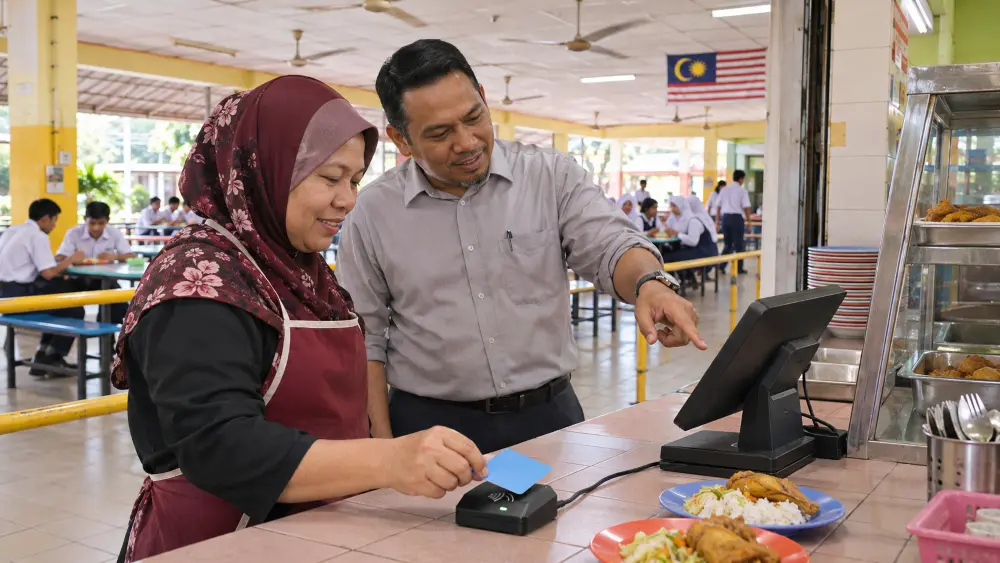
A limited introduction means starting with selected students or counters before involving everyone. It can help a school find account and training problems while fewer families are affected. A whole-canteen launch gives all families and stalls one changeover date, but everyone needs to be ready together.
| Approach | When It May Help | What To Prepare |
|---|---|---|
|
Start with a group or selected counters |
The school needs to test real purchases and support arrangements before expanding. |
Tell students which counters and payment methods apply. Confirm that staff can serve students using different payment methods without creating another queue. |
|
Launch across the canteen |
Families and stalls can prepare together, and one changeover date is easier to communicate. |
Check accounts and cards, train staff at every stall and agree how meals will be served if payment is unavailable. |
Before selecting a trial group, check with QubeApps and the stall operators whether the chosen cards and counters can be introduced separately. A small trial will reveal little if it runs only during a quiet demonstration. It needs to include the ordering, payment and food collection that happen during a busy recess.
Prepare parents, students and counter staff
Help families complete the account setup
Parents need to know how to access the account, link it to the correct child where required, add money and check that the balance is ready to spend. Explain any top-up fees, when the added money will be available to spend and whom to contact if the balance does not update. Sending instructions is only the first step; the school also needs to know which families are still unable to complete the setup.
For example, Eaton International School’s cashless payment instructions describe account linking and top-ups through online transfers or cash at reception. These are that school’s arrangements. Prepare instructions for the methods your school will actually provide, and agree an available alternative for families who cannot use the proposed app or online method.
Assign a school office contact to follow up missing cards, login problems and top-ups that have not appeared. Resolve these cases before the affected students are expected to rely on cashless payment. Otherwise, parents may believe they have paid while their children reach the counter without a usable balance.
Practise purchases and payment problems
Show students where to present their cards and how to recognise a completed purchase. Check that cards have arrived and any required activation has been completed. Where the system allows a practice purchase, use it to check that the right student’s balance is charged.
Train staff at every participating stall to select the correct food and price, confirm payment and respond when a card is rejected. If staff cannot tell whether payment went through, they should check the purchase record before trying again. If it remains unclear whether money was taken, they should refer the query to the designated support contact and follow the school’s agreed procedure for serving the meal.
Keep account enquiries separate from serving food where staffing and space allow. The cashier serves the queue; a named school contact follows up the account problem with the family or QubeApps support team, according to the support arrangement agreed for the school. This prevents one enquiry from stopping purchases for the students behind it.
Make sure students can receive meals when payment fails
When one student cannot pay
A forgotten card or insufficient balance can leave a child at the counter without a way to pay. Staff need an approved response before this happens, including who can authorise a meal and who will contact the parent about any amount due. Leaving the cashier to decide during recess can delay the queue and leave the student unsure whether they will receive food.
For example, the school and stall operator could agree to serve a meal and have a named staff member record the student, food, amount and whether payment is still due. They would also need to agree who follows up the payment and who is responsible if it remains unpaid. This is a possible school procedure that must be agreed with the operator before launch.
If the cashier cannot tell whether a payment succeeded, check the purchase record before taking payment again. A second charge can turn a counter problem into a parent complaint and require staff to investigate and arrange a correction.
When a counter loses power or connectivity
An internet connection problem or power outage may stop normal payment at several counters. Confirm with QubeApps what the proposed system can still do in each situation, including whether any functions work without an internet connection. Do not assume that card payments will continue.
Agree who informs stall staff and authorises the alternative meal-service procedure. One option, if the school and operators approve it, is to keep temporary records of meals served and amounts due. After normal payment resumes, a named person should compare these records with completed payments. This helps prevent missed collections and duplicate charges.
Check that students still have time to buy and eat food
Compare service before and after the change
Before launch, observe a normally busy recess. Note how long students spend ordering, paying and collecting food, and whether they have enough time left to eat. Repeat the observation during the cashless introduction under similar conditions, including the number of students and counters in use.
Record where students wait and why staff need help. A quick card payment does not shorten a queue if students still wait for orders to be prepared or cannot find the collection point. Our article on common canteen management problems explains how payment, ordering and food collection can contribute to delays.
Resolve repeated problems before involving more students
Before involving more students, resolve recurring login, card or balance problems reported by students and families. If food collection is causing delays, improve the collection process and test it again. Expanding while these problems continue gives staff more cases to handle during the same short break.
Expand when students can buy and collect food with enough time remaining to eat, and staff can handle payment problems without repeatedly stopping service. The school’s recess length and normal demand should guide that decision, rather than the date on the launch plan alone.
Build the Business Case Around Actual Costs
Before buying school canteen software and equipment, ask QubeApps to set out the functions, counter devices and support included in the proposal. Confirm any purchase, ongoing, transaction or top-up charges that apply. This gives the school a basis for comparing costs with the work the system is expected to replace or reduce.
Also establish who holds money added in advance, what happens to unused balances and refunds, and how and when each stall operator receives payment. Decide who can view student spending records and which sales reports the school and operators receive. These details help staff trace a disputed purchase and check what each operator is owed.
Plan a cashless school canteen with QubeApps

QubeApps partnered with Skribble Lab to provide the cashless canteen management system at Pin Hwa Independent High School. The published case describes contactless student cards, parent app top-ups and spending limits, with sales information and reports for school management. It shows how cards, parent account management and school reporting can be used together.
QubeApps provides canteen management software and counter equipment. Agree with QubeApps which payment, top-up and reporting functions your school will use. Before launch, the school and stall operators should decide how meals will be served when payment fails, what parents need to know and who will follow up unpaid purchases.