
For many SMEs in Malaysia, technology often starts with the basics: laptops, internet connection, email accounts, accounting software and a few shared folders. This may be enough when the business is small. But as the company grows, the same simple setup can start creating bigger operational problems.
Wi-Fi becomes unstable. Staff use different devices with different security standards. Files are scattered across personal drives. Software licences are not properly managed. Backups are unclear. Cybersecurity depends too much on individual habits. When something breaks, the team reacts only after operations are already affected.
This is where business IT solutions become important. They are not only about buying hardware or installing software. The real purpose is to build a more reliable, secure and scalable technology foundation so the business can operate better, reduce downtime and support future growth.
For SMEs, startups, corporate offices and growing companies, the right IT setup should help answer practical questions:
- Can our team work efficiently without constant technical disruptions?
- Are our systems and business data properly protected?
- Do we have reliable backup if something fails?
- Are our software tools licensed, secure and suitable for our workflow?
- Can our IT setup support more users, branches, customers or transactions?
- Do we know which IT area to prioritise first?
This guide explains the key IT solutions for SMEs in Malaysia, how each solution supports business operations, and how to decide what your company may need at different stages of growth.
Table of Contents:
What Are Business IT Solutions?
Business IT solutions refer to the technology systems, infrastructure, software, devices, security tools and support services that help an organisation run its daily operations efficiently and securely.
For SMEs, business IT solutions may include:
This does not mean every SME needs every solution immediately. A small professional services firm, a retail head office, a startup, a logistics company and a regional corporate office may all have different priorities. The key is to understand the business problem first, then match it with the right technology area.
Why SMEs Need a Stronger IT Foundation
Many SMEs grow faster than their internal systems. What worked for a five-person team may no longer work when the company has 30, 50 or 100 employees. As more people rely on digital tools, the risk of operational disruption also increases.
According to SME Corp Malaysia, SMEs in the services and other sectors are generally defined by sales turnover or number of full-time employees. This means many different types of businesses fall under the SME category, from small offices and service firms to growing multi-location companies.
The challenge is that SMEs often need to balance cost, productivity, security and scalability at the same time. They may not have a large internal IT department, but they still depend on technology every day.
A stronger IT foundation helps SMEs:
The Malaysian Institute of Accountants highlights an important principle for SMEs: as businesses grow, owners cannot continue wearing every hat. They need the right professionals, systems and processes to support sustainable growth. The same logic applies to IT. At a certain point, SMEs need more than ad hoc troubleshooting. They need a structured technology foundation.
Common IT Challenges Faced by SMEs
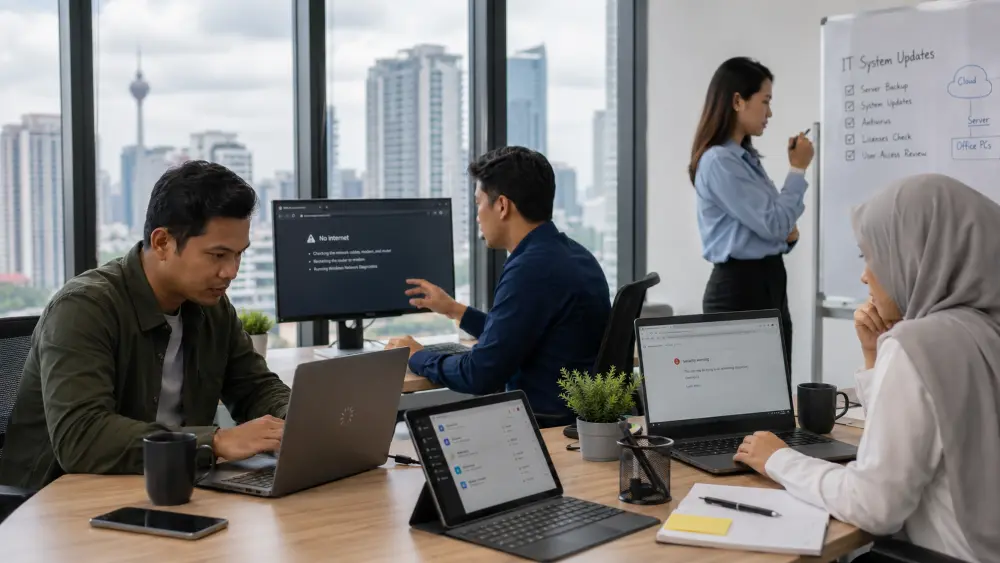
Before choosing any solution, SMEs should identify the problems affecting their operations. Many IT issues are connected. A company may think the issue is “slow internet,” but the real problem could involve weak Wi-Fi coverage, old devices, poor network design, overloaded systems or lack of monitoring.
Here are common IT challenges SMEs face:
Not Sure Which IT Issue to Prioritise?
Start by identifying which issue has the greatest impact on your daily operations, security or future growth. The prioritisation table below can help you match common business problems with the relevant IT solution.
QubeApps can also review your network, cybersecurity, backup, devices and software environment to help identify the most urgent areas for improvement.
Contact QubeApps to identify the right IT priorities for your business.
Is This Guide Relevant to Your Business?
This guide is mainly written for SMEs in Malaysia, but it is also relevant to startups, corporate offices, MNC regional offices and growing companies that want to improve their IT setup.
Different businesses may have different priorities:
| Business Type | Common IT Priorities |
|---|---|
| Startup | Cloud tools, laptops, email, collaboration platforms, basic cybersecurity and scalable software |
| Small SME office | Stable Wi-Fi, Microsoft 365 for business, device setup, backup, IT support and endpoint security |
| Growing SME | Managed IT services, cybersecurity, network infrastructure, business software, access control and reporting |
| Professional services firm | Secure document access, client data protection, licensed software, backup and communication tools |
| Multi-branch business | Standardised devices, centralised support, secure connectivity and consistent systems |
| Corporate office | IT governance, endpoint management, cybersecurity, business continuity and vendor coordination |
| MNC or regional office | Compliance, multi-location support, standardised infrastructure, advanced security and reporting |
This guide is mainly written for SMEs in Malaysia, but it is also relevant to startups, corporate offices, MNC regional offices and growing companies that want to improve their IT setup.
Different businesses may have different priorities:
- Startup: At the startup stage, common IT priorities may include cloud tools, laptops, email, collaboration platforms, basic cybersecurity and scalable software.
- Small SME office: A small SME office may need stable Wi-Fi, Microsoft 365 for business, device setup, backup, IT support and endpoint security.
- Growing SME: A growing SME may require managed IT services, cybersecurity, network infrastructure, business software, access control and reporting.
- Professional services firm: Professional services firms often need secure document access, client data protection, licensed software, backup and communication tools.
- Multi-branch business: A multi-branch business may need standardised devices, centralised support, secure connectivity and consistent systems across locations.
- Corporate office: Corporate offices may require IT governance, endpoint management, cybersecurity, business continuity and vendor coordination.
- MNC or regional office: An MNC or regional office may need compliance support, multi-location support, standardised infrastructure, advanced security and reporting.
Key Business IT Solutions SMEs Should Consider
1. Network Infrastructure and Office Wi-Fi
Network infrastructure is the foundation of your office IT environment. It includes connectivity, routers, switches, access points, structured cabling, servers, firewalls and related network components.
For SMEs, poor network infrastructure can affect almost every digital workflow. Cloud systems become slow. Video calls drop. POS or business software may lag. File access becomes inconsistent. Staff may waste time switching connections or restarting devices.
A proper office network setup helps businesses improve:
For a small office, the first priority may be stable Wi-Fi and secure access. For a growing SME, the priority may expand to structured cabling, network segmentation, firewall setup, remote access and monitoring.
SMEs should avoid treating network setup as a one-time installation. As the business adds more devices, users and applications, the network should be reviewed and optimised. For smaller offices, even a small office network setup should be planned with security, coverage and future scalability in mind.
2. Cybersecurity for SMEs
Cybersecurity is no longer only a concern for banks, large corporations or government-linked organisations. SMEs also handle customer information, financial records, business documents, email accounts, supplier details and employee data.
NACSA advises businesses to protect both their business and customers against cyber threats by strengthening cybersecurity controls and workplace defences. For SMEs, this is important because cyber incidents can lead to downtime, financial loss, reputational damage and legal consequences.
SMEs often face cybersecurity risks such as phishing attacks, weak password practices, shared accounts, unsecured devices, outdated software, poor access control, ransomware threats, insufficient data backup, unprotected remote access and lack of employee awareness. These risks can expose business systems and sensitive data to potential breaches.
Cyber security solutions for SMEs may include:
The goal is not to make SMEs fearful. The goal is to help businesses build practical protection based on their risk level. A small company may start with email security, endpoint protection, backup and password controls. A larger SME may need managed cyber security services, security monitoring, incident response planning and governance support.
For smaller companies, cybersecurity solutions for small business should be practical, manageable and aligned with the company’s actual risk exposure.
3. Endpoint Security and Device Protection
Endpoint security protects devices such as laptops, desktops, tablets and mobile devices that connect to your business network.
For SMEs, endpoint security matters because employees often use devices to access email, files, cloud platforms, customer records and business systems. If one device is compromised, it can create wider risk for the organisation.
Endpoint security may include:
This is especially important for hybrid work, remote staff, sales teams and businesses with multiple branches. Devices should not be treated as isolated purchases. They are part of the company’s security environment.
4. Cloud Backup Solutions and Business Continuity
Many SMEs rely on digital files, accounting systems, emails, customer records and operational data. But not all businesses have a proper backup and recovery plan.
Cloud backup solutions help businesses store copies of important data securely so they can recover information when something goes wrong. This may include accidental deletion, device failure, ransomware, server issues or system migration problems.
A practical backup strategy should answer:
- What data needs to be backed up?
- How often should backup happen?
- Where is the backup stored?
- Who can access it?
- How quickly can the business recover?
- Has the recovery process been tested?
Business continuity is not only about backup. It is about ensuring the company can continue operating when disruption happens. For SMEs, this may involve backup systems, cloud access, disaster recovery planning, support response and clear internal procedures.
A backup that cannot be restored quickly is not enough. SMEs should review both backup and recovery. For smaller teams, cloud backup solutions for small business can help protect important files and systems without overcomplicating the IT environment.
5. Business Software Solutions
Software plays a major role in how SMEs communicate, manage information and run daily operations.
Many SMEs face software management challenges such as unclear licence ownership, shared user accounts, inactive employee access, files stored in personal drives, inconsistent software usage across departments, unstructured folder systems, limited access control and poor system integration. Over time, these issues can reduce efficiency, increase security risks and make business operations harder to manage.
Business software solutions may include:
For SMEs, the question is not always “which software is the best?” A better question is “which software fits our workflow, budget, security needs and growth stage?”
Software should help the business reduce manual work, improve visibility and support better decisions. It should not create more confusion.
6. Client Devices and End-User Computing
Client devices include laptops, desktops, monitors, workstations, peripherals, docking stations, headsets and other workplace tools used by employees.
For SMEs, device planning is often overlooked. Many companies buy devices only when someone joins or when an old laptop breaks. Over time, this creates inconsistency.
Some staff may have fast devices. Others may struggle with outdated laptops. Some devices may be properly secured. Others may have old software, weak passwords or unsupported operating systems.
A better approach is to standardise device planning. This may include:
Reliable devices improve productivity. Secure devices reduce risk. Standardised devices make IT support easier.
7. Communication and Collaboration Solutions
Modern SMEs need more than phone calls and email. Teams may work across branches, departments, customer sites or hybrid environments.
Communication and collaboration solutions may include:
Poor communication tools can slow down decisions and create confusion. For example, customer service may miss follow-ups, project teams may work from different document versions, and management may not have visibility into discussions or approvals.
The right communication setup helps SMEs improve coordination, response time and customer experience.
8. Managed IT Services
Many SMEs do not have a full internal IT team. Some rely on one internal staff member, an external technician or ad hoc vendor support. This may work at the beginning, but it becomes harder as the business grows.
Managed IT services provide structured support for daily IT operations. This may include monitoring, troubleshooting, maintenance, user support, vendor coordination, cybersecurity support, software management and device support.
Managed IT services can help SMEs:
This does not mean every SME must outsource everything. Some companies may keep internal IT while using managed services for specific areas such as cybersecurity, backup, network monitoring or end-user support.
For smaller companies, managed IT services for small businesses can provide structured support without requiring a full internal IT department from the beginning.
The key is to avoid relying only on firefighting. IT should support business continuity, not constantly interrupt it.
How SMEs Should Prioritise IT Investments
A common mistake is trying to fix everything at once. Another mistake is buying technology without knowing the root problem.
A more practical approach is to prioritise based on business impact.
- Slow Wi-Fi, unstable connection or poor office coverage: Consider reviewing your network infrastructure and office Wi-Fi setup.
- Frequent laptop or device issues: Consider client device standardisation and lifecycle planning.
- Fear of phishing, ransomware or data exposure: Consider a cybersecurity assessment and endpoint security review.
- No proper backup or recovery plan: Consider cloud backup solutions and business continuity planning.
- Staff use different software or unmanaged licences: Consider reviewing software licensing and access control.
- IT issues take too long to resolve: Consider managed IT services or structured IT support.
- Teams struggle to communicate across locations: Consider communication and collaboration solutions.
- Management lacks visibility into business performance: Consider business software solutions, ERP, CRM or BI reporting.
- Business is expanding to more users or branches: Consider IT infrastructure solutions, standardisation and a support roadmap.
SMEs should start with the areas that create the highest operational risk or business inefficiency.
A common mistake is trying to fix everything at once. Another mistake is buying technology without knowing the root problem.
A more practical approach is to prioritise based on business impact.
| If Your Business Is Facing This | Consider Prioritising |
|---|---|
| Slow Wi-Fi, unstable connection or poor office coverage | Network infrastructure and office Wi-Fi review |
| Frequent laptop or device issues | Client device standardisation and lifecycle planning |
| Fear of phishing, ransomware or data exposure | Cybersecurity assessment and endpoint security |
| No proper backup or recovery plan | Cloud backup solutions and business continuity planning |
| Staff use different software or unmanaged licences | Software licensing and access control review |
| IT issues take too long to resolve | Managed IT services or structured support |
| Teams struggle to communicate across locations | Communication and collaboration solutions |
| Management lacks visibility into business performance | Business software solutions, ERP, CRM or BI reporting |
| Business is expanding to more users or branches | IT infrastructure solutions, standardisation and support roadmap |
How IT Needs Change as Your Business Grows
IT priorities change over time. A startup may need speed and flexibility. A growing SME may need structure and security. A corporate office may need governance and standardisation.
How QubeApps Supports SMEs and Growing Businesses
QubeApps helps businesses strengthen their IT environment across infrastructure, cyber security, software, devices, communication tools and managed IT services. Rather than recommending every solution at once, QubeApps helps businesses identify the areas that require immediate attention based on their operations, risks and growth plans.
With 14+ years established, a presence across 16 countries, trusted technology partners and a local support team, QubeApps supports organisations that want to improve how their technology environment operates and scales.
We will review the areas below:
- Network infrastructure and office Wi-Fi
- Cyber security solutions and endpoint security
- Cloud backup solutions and business continuity
- Microsoft 365 for business and business software solutions
- Client devices and workplace equipment
- Communication and collaboration systems
- Managed IT services and ongoing support
- IT assessment and technology planning
Our goal is to help businesses invest in the right areas at the right stage of growth. Some SMEs may need to fix unstable connectivity first. Others may need cyber security and backup. Some may need better software management. Others may need structured IT support because recurring issues are affecting productivity.
The right starting point depends on your current environment, business size, operational risks and growth plans.
How to Choose the Right IT Solutions Provider
The right IT provider should do more than recommend individual products. It should first understand your business operations, existing systems, risks and future plans.
When evaluating a provider, consider:
A suitable provider should help your company make informed technology decisions rather than encourage unnecessary investment.
Identify the Right IT Priorities Before You Invest

Business IT solutions are no longer optional for growing SMEs in Malaysia. As companies become more dependent on digital tools, cloud systems, online communication and business software solutions, the quality of the IT environment directly affects productivity, security and business continuity.
The right IT foundation can help SMEs reduce downtime, protect business data, improve collaboration, manage devices and software more effectively, and scale with greater confidence. However, the goal is not to adopt every technology at once. The goal is to understand your current business needs, identify the biggest risks and prioritise the right solutions based on your stage of growth.
Many SMEs know they need better IT, but they are not always sure where to start. Should you improve Wi-Fi first? Upgrade devices? Strengthen cyber security? Move backup to cloud? Review Microsoft 365 for business licences? Get managed IT services? Replace outdated systems?
A practical IT assessment can help identify current IT gaps, security risks, downtime risks, device and software issues, backup weaknesses, network performance problems, areas of wasted cost and priorities for future growth.
Contact QubeApps to identify the right IT priorities for your business.