
Retail stocktaking has never been anyone's favourite task. It's time-consuming, physically tiring, and often done after hours or during slow trading periods. Yet despite how routine retail stocktaking feels, it is one of the most critical activities in retail inventory management. When retail stocktaking goes wrong, everything downstream—replenishment, reporting, and planning—suffers.
In many retail environments, stock discrepancies are blamed on "system issues" or "data problems." In reality, the root cause usually starts much earlier, on the shop floor, during retail stocktaking itself. This is where the right mobile computer for stocktaking can quietly make a measurable difference to inventory accuracy.
Stocktaking Challenges in Retail Environments
Most retail teams are familiar with the same set of problems during retail stocktaking.
Manual counting is slow and repetitive. Staff move aisle by aisle, shelf by shelf, often cross-checking printed lists or handwritten notes. As the hours pass, fatigue sets in. Concentration drops, counts are rushed, and small mistakes begin to creep in, directly affecting inventory accuracy.
Human error is another constant challenge. Items are miscounted, similar SKUs are confused, barcodes are skipped, or counts are written down incorrectly. Even when the mistake is small, it adds up across hundreds or thousands of products, weakening retail inventory management and long-term inventory accuracy.
There is also a delay between counting stock and updating the system. When numbers are recorded on paper or entered later at a workstation, discrepancies can remain unresolved for days. By the time issues are spotted, staff may no longer remember what happened during retail stocktaking.
These challenges aren't caused by carelessness. They are the natural result of using tools that were never designed for fast, accurate, frontline retail stocktaking.
The Role of Mobile Computers in Improving Stocktaking Workflows
Dedicated devices such as a mobile computer for stocktaking change the way retail stocktaking is done, not by adding complexity but by removing unnecessary steps.
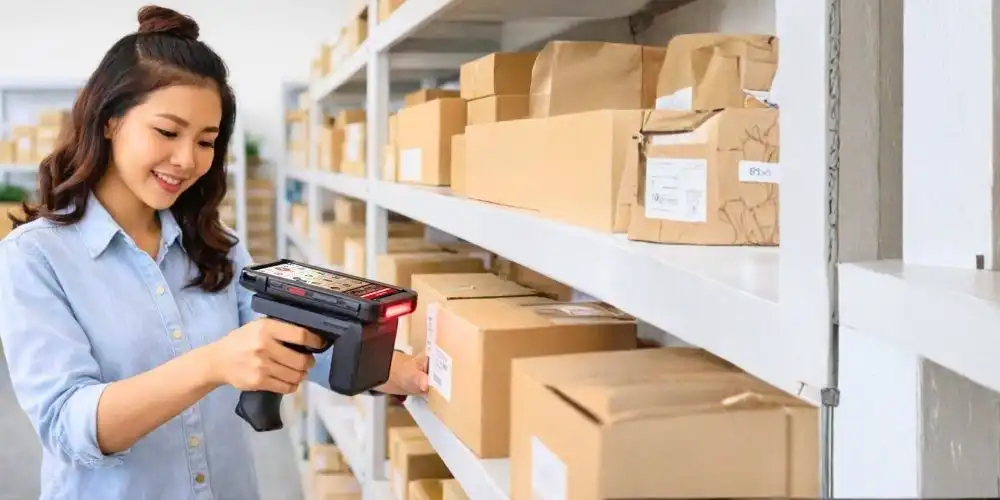
Instead of counting items, writing numbers down, and re-keying data later, staff scan items directly at the shelf using barcode scanning devices. The mobile computer for stocktaking identifies the product instantly, prompts for quantity, and records the data in a structured format that supports better inventory accuracy.
This streamlines the workflow into a single, repeatable process. Scan. Count. Confirm. Move on. Using barcode scanning devices reduces dependency on memory and manual interpretation during retail stocktaking.
Barcode scanning also reduces guesswork. Staff no longer need to interpret product names or SKU codes manually. Barcode scanning devices do the identification work, allowing staff to focus on accuracy rather than administration.
Over time, this creates consistency. Different staff members follow the same process across different shifts or outlets. That consistency is often the missing link in strong retail inventory management and sustained inventory accuracy.
Practical Benefits of Using a Dedicated Mobile Computer
The benefits of using a mobile computer for stocktaking are not theoretical. They show up clearly in day-to-day retail operations.
Stock takes are completed faster, even with smaller teams. Because scanning and data capture happen in one step using barcode scanning devices, less time is spent double-checking or correcting errors later in the retail inventory management process.
Counting errors are reduced. While no tool can eliminate mistakes entirely, barcode scanning devices significantly lower the chances of misidentifying items or entering incorrect SKUs, protecting inventory accuracy during retail stock taking.
Post-stock-take rework is also minimized. When data is captured accurately at the source using a mobile computer for stocktaking, there is less need for reconciliation, investigation, or manual adjustments in backend retail inventory management systems.
Perhaps most importantly, staff experience improves. Using a purpose-built mobile computer for stocktaking is less tiring than juggling clipboards, paperwork, or consumer devices that are not designed for long operational use. When the process feels easier, teams are more likely to take retail stocktaking accuracy seriously.
How Mobile-Based Stock Taking Supports Accurate Backend Inventory
Backend inventory systems are only as reliable as the data they receive. No matter how advanced the system is, inaccurate inputs will always produce unreliable outputs and poor inventory accuracy.
Mobile-based retail stocktaking improves data quality at the point of capture. Counts are recorded in a structured, standardized format using barcode scanning devices, reducing inconsistencies across locations or teams and strengthening retail inventory management.
In many setups, stock data can be synced in real time or near real time from the mobile computer for stocktaking. This shortens the gap between physical stock and system records, allowing discrepancies to be identified earlier rather than weeks later, improving overall inventory accuracy.
Cleaner data also improves downstream processes. Replenishment decisions become more accurate. Stock movement reports reflect reality more closely. Management teams gain confidence in the numbers they review within their retail inventory management systems. Instead of constantly questioning inventory reports, teams can focus on improving availability and reducing waste through better retail stocktaking practices.
The Link Between Frontline Stocktaking and Backend Systems
Retail inventory management accuracy is often discussed as a system problem, but it is fundamentally a frontline process issue.
What happens on the shop floor during retail stocktaking directly determines what the backend system sees. If retail stocktaking is rushed, inconsistent, or manual, even the best platform will struggle to maintain inventory accuracy.
This is where mobile computers for stocktaking act as a bridge. They translate physical stock into clean digital data using barcode scanning devices, allowing backend systems to rely on frontline inputs.
Inventory platforms such as QubeWMS, for example, depend on accurate frontline data from mobile computers for stocktaking to support consistent retail inventory management across locations and channels.
When frontline tools and backend systems work in sync, inventory management becomes less reactive. Instead of constantly fixing discrepancies, teams can focus on prevention, optimization, and long-term inventory accuracy.

Why Accurate Inventory Starts on the Shop Floor
Retailers do not usually struggle with retail stocktaking because their teams are incapable. They struggle because the tools in use make accuracy harder than it needs to be.
A mobile computer for stocktaking does not magically solve inventory problems, but it removes many of the friction points that cause errors in the first place. By improving how retail stocktaking is performed on the floor, it gives backend retail inventory management systems a fair chance to do their job properly.
In the end, accurate inventory does not start in the system. It starts when your team can count faster, make fewer mistakes, and trust the numbers they record every single time through the use of the right tools and barcode scanning devices.
If you are reviewing how your current stocktaking process works, speak with our team to understand how the right mobile tools can support more accurate inventory operations.